Press CTRL + D to bookmark this page.
New extention


I like

You can rearrange the buttons in the order you like by Drag and Drop.


Showing posts with label Creative Labs. Show all posts
A new app build by the Facebook's Messenger team can help you to see who is calling you. The app is in a test phase but it promise to be one of the app that you will use to call friends.


In the Facebook post about the app is written "When you get a call, Hello will show you info about who’s calling you, even if you don’t have that number saved in your phone. You will only see info that people have already shared with you on Facebook. You can also search for people and businesses on Facebook and call them with just one tap. So if a friend tells you about a new restaurant in your neighborhood, you can use Hello to find their hours, make a reservation and get directions, all without leaving the app."

Here is a video:


You can test the app and see if it is for you now. But this is a beta so give time to Facebook and wait for the improvements in the Hello app.

Here is the app for the Android users in Google Play Store:

This is the first app's icon from Facebook with the Material design style


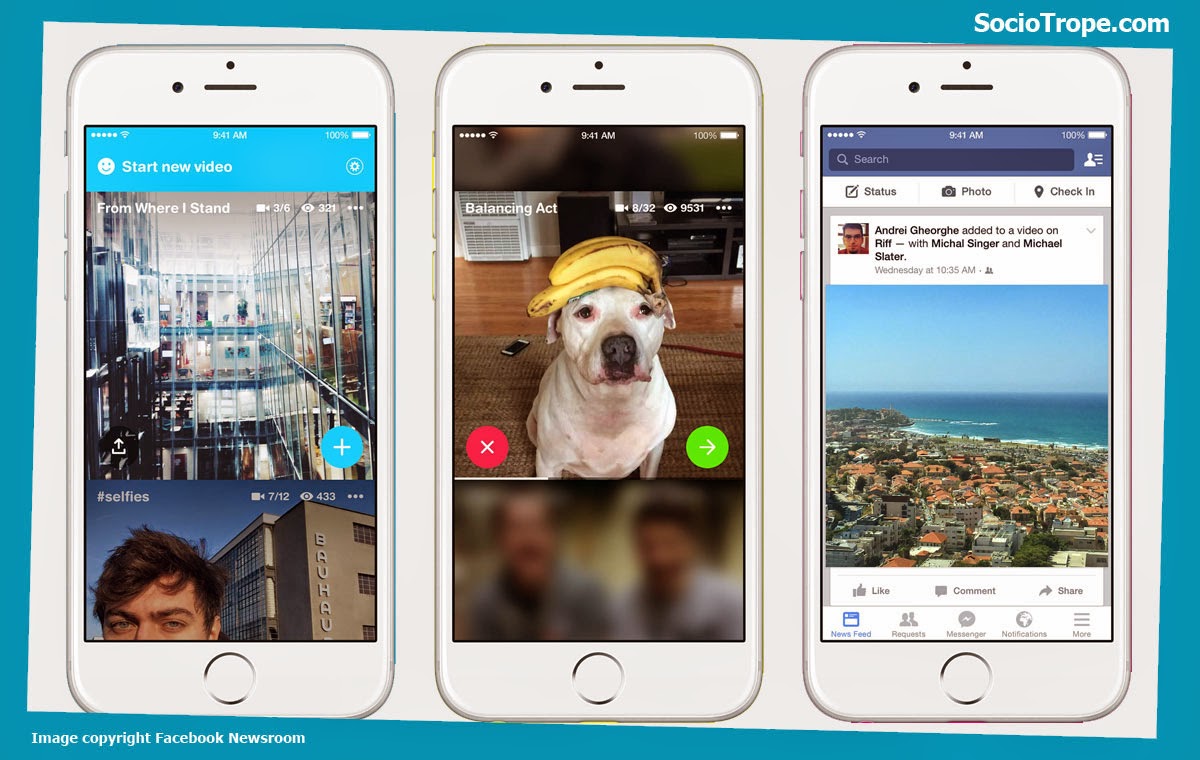
3, 2, 1 Riff! A new great tool comes from the Facebook Creative Labs. Now you can easy create videos and share it with your Facebook friends in the Riff app or in Facebook. But you are not alone. All you friends can add some video sequence to your video. And it will be a big fun video. What's a teamwork!


Here are the steps to make a popular video on Facebook:

1. Have a cool idea and shot a short video.
2. Publish the video on Riff.
3. All your friends and your friend's friends can see the video and decide to add their clips to your video.
4. Make the short film popular - on Facebook, Youtube and anywhere else on Internet.

Image from newsroom.fb.com
Download Riff from Google Play Store and Apple App Store.
Here are some ideas you can create.
1. Start a birthday video wish and ask all your friends to join.
2. Shot a video of your hand - every hand is unique so beg your friends to film their hands and add the video to yours.
3. Film the view from your window.
4. Make 10 push-ups and count till 100+ with the added friend's videos.
5. Smile for the camera. Make the biggest smile with Facebook friends.
6. Thanks for sharing :)

Why we need another app for something that we already use in the Facebook mobile phone app? The answer is simple: because it loads quicker, have unique design and you can access a big functionality on Facebook just with one click over the app icon. So we wait for the next apps from Facebook: News Feed, Search, Notifications, Photos and Statuses.

Facecbook Groups App Icon
Source Play Store

Let we see the Groups app.
It has a circle app icon and it look more in the iPhone iOS look. You can recognize the idea of the mind bubble. Light gradients and powerful colors. Facebook Groups use the same icon for iPhone and for Android, wich is not correct if you check the new Material Design guidelines.


Facecbook Groups Material Design
Image copyright Sociotrope.com


Here is a example how it have to be for Android. The idea comes from the Material Design: "Product icon design is inspired by the tactile and physical quality of material. Each icon is cut, folded, and lit as paper would be, but represented by simple graphic elements. ... The matte-like finish interacts with light through subtle highlights and consistent shadows." Maybe Facebook Creative Lab will change the icon in future for Android phones.


If you want to test something new, here is the new iOS app Rooms.
It allows you to create like in the old time chat-rooms but now you can post not only text but also photos and videos.
Images copyright Facebook Newsroom and Rooms
Start creating a room about something you love. Or just find an existing room and ask to join. Its like the groups in Facebook but you can customize the room like you like. Change color, the font, the name of  the "like button", add cover photo, dominant colors. This is only the basic Rooms. In future we will see more features. Take a try if you are an iPhone user and download the app from the Apple App Store.

Here are some screenshots from the Facebook Creative Lab about they new iOS app Rooms:

Style your room create a room choose a nickname Post photo, video and notes